 Shopify App Store
Ship Together
Stop split orders: ship an order from one location, and chosen products only from where you say.
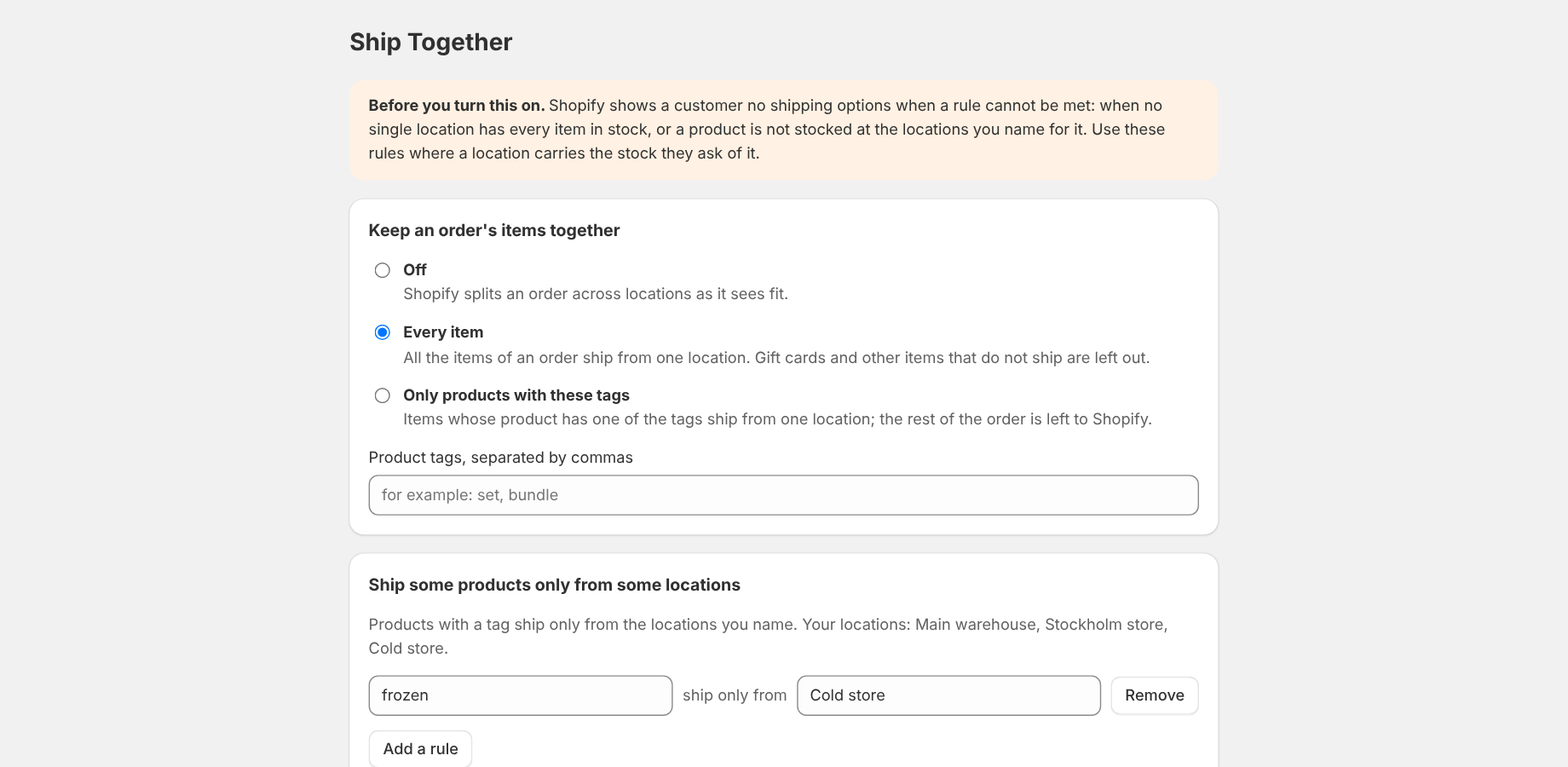
What it does
Shopify decides at checkout which of your locations each item of an order ships from, and splits the order when no single location has everything. Ship Together lets you set rules for that decision:
- every item of an order ships from one location;
- or only the products with tags you choose ship from one location;
- products with a tag ship only from the locations you name.
Before you turn it on
When a rule cannot be met, Shopify shows the customer no shipping options. That happens when:
- you keep items together and no single location has all of them in stock;
- you name locations for a product and none of them has it in stock.
The app cannot see your stock, so it cannot make an exception. Use a rule where a location really carries what the rule asks of it: a main warehouse that stocks everything, a cold store that holds all frozen goods.
Setting it up
- Open Ship Together from Apps in your Shopify admin.
- Under Keep an order's items together, choose Every item, or Only products with these tags and type the tags, separated by commas.
- Under Ship some products only from some locations, choose Add a rule, type the product tags, and the names of the locations, as they are called under Settings, Locations.
- Choose Save. Checkout follows it at once.
To turn everything off, choose Off, remove the rules, and save.
What is left out
Gift cards and digital products do not ship, and no rule holds them. Local pickup and local delivery are not affected: the rules are for shipping.
Limits
- Shopify allows at most 25 fulfilment rules of this kind in a shop, from all apps together. Ship Together uses one.
- Tags are matched whatever their case.
- A location is named, not chosen from a list: if you rename a location, change the rule to match.
Your data
The app keeps nothing. Your rules are stored by Shopify, in your own shop, and the page reads and writes them as you. See the privacy policy.
Help
Write to support@sigfrid.systems. Say which rule you set, and what checkout showed.
Questions
What does Ship Together cost?
One plan, 9 USD a month, with a 14-day trial, charged through Shopify with your Shopify bill. It is free in development stores.
Does any of our store data leave Shopify?
No. The app keeps nothing. Your rules are stored by Shopify, in your own shop, and the app's page reads and writes them as you. At checkout, the rules are applied by the app's Shopify Function, which runs on Shopify.
What permissions does it ask for, and why?
write_fulfillment_constraint_rules, to create and change the rule checkout follows;read_locations, to show your locations and to refuse a location name your shop does not have.
What happens if we uninstall the app?
Checkout is no longer held to your rules, because the app's Function is what applies them. The app keeps no data of yours, so there is nothing of ours to delete.
Why do customers see no shipping options?
A rule cannot be met for their cart. That happens when you keep items together and no single location has all of them in stock, or when you name locations for a product and none of them has it in stock. The app cannot see your stock, so it cannot make an exception.
Use a rule only where a location carries what the rule asks of it, such as a main warehouse that stocks everything. To lift a rule at once, open Ship Together, change or remove it, and choose Save.
A rule for some locations has no effect. What do I check?
- That the location names match those under Settings, Locations. The page refuses a name your shop does not have, and says so.
- That you changed the rule after renaming a location. A location is named, not chosen from a list.
- That the products carry the tag the rule names.
- That both the tags and the locations are filled in. A rule without either is not made.
Why are some items not held to the rules?
Gift cards and digital products do not ship, so no rule holds them. Local pickup and local delivery are not affected; the rules are for shipping. A rule that keeps items together holds only when the cart has two or more different products or variants it applies to.
How do we turn it off?
Open Ship Together from Apps in your Shopify admin, choose Off under Keep an order's items together, remove the rules under Ship some products only from some locations, and choose Save. Checkout follows it at once.
How many rules of this kind can a shop have?
Shopify allows at most 25 fulfillment rules of this kind in a shop, from all apps together. Ship Together uses one, whatever you set in it.
How do we get help?
Write to support from https://mart.sigfrid.systems/support/. Say which rule you set, which products and locations it names, and what checkout showed, and copy any message word for word.
Still stuck? Search every app's help in the help centre, or write to us.
More from Sigfrid Mart
-

Capped Discounts
Percentage discounts with a maximum amount off: 10% off, never more than you set.
-

TagPrice
Member pricing for Shopify. Customers tagged Member pay the member price you set on each product.