 Atlassian Marketplace
Portal Request Details for Jira Service Management
Show customers custom fields, the assignee, SLA time left and linked requests on the portal.
What it does
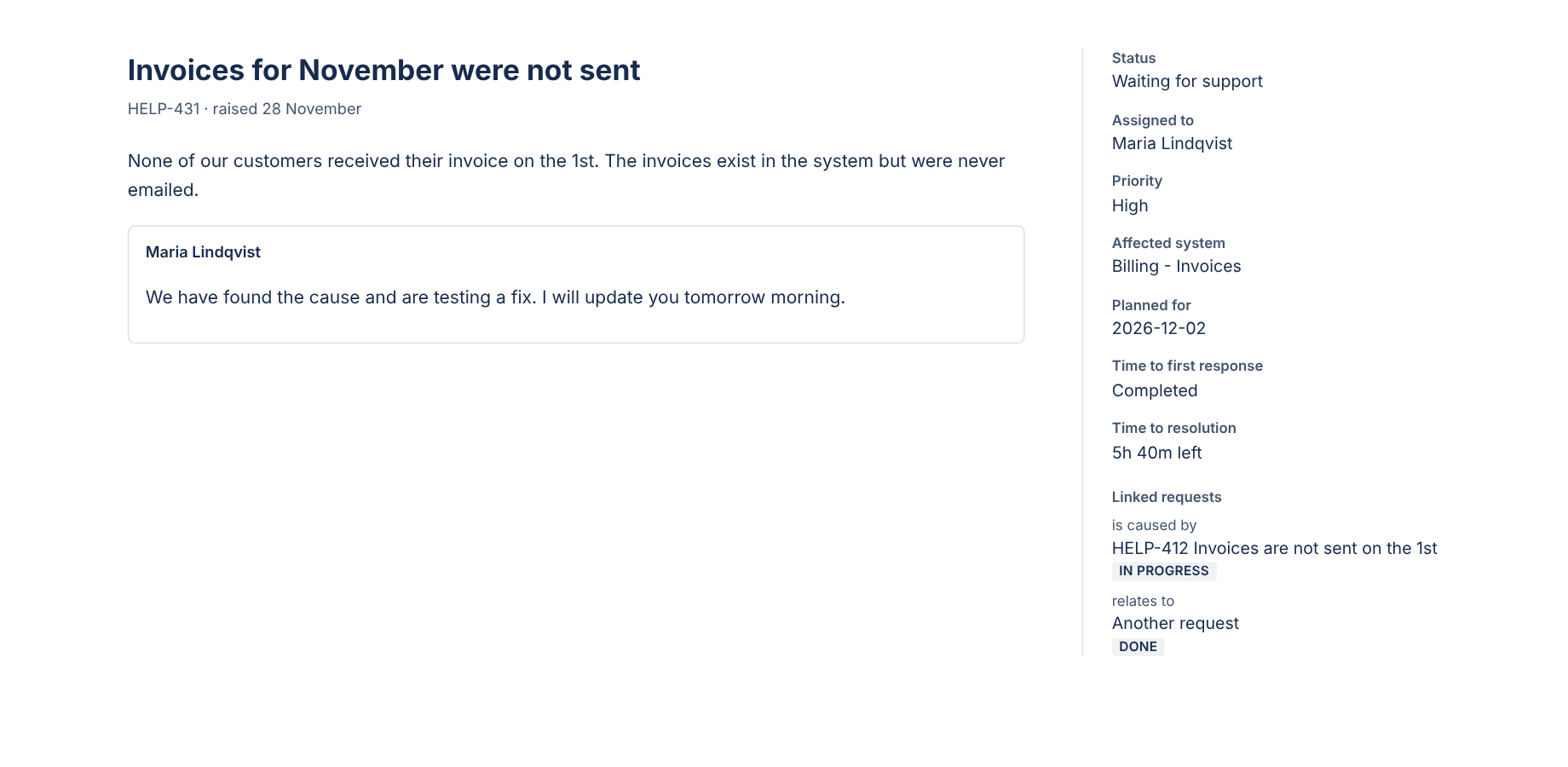
On the portal page of a request, beside the request, customers see what you have chosen to show them of what your team keeps on it:
- fields that are not on the request form;
- the status and who the request is assigned to;
- each service level agreement, with the time left;
- requests linked to it.
It is read-only, and nothing is shown until you choose something.
Setting it up
You need to administer the service project.
- Open the project, then Project settings, Apps, Portal request details.
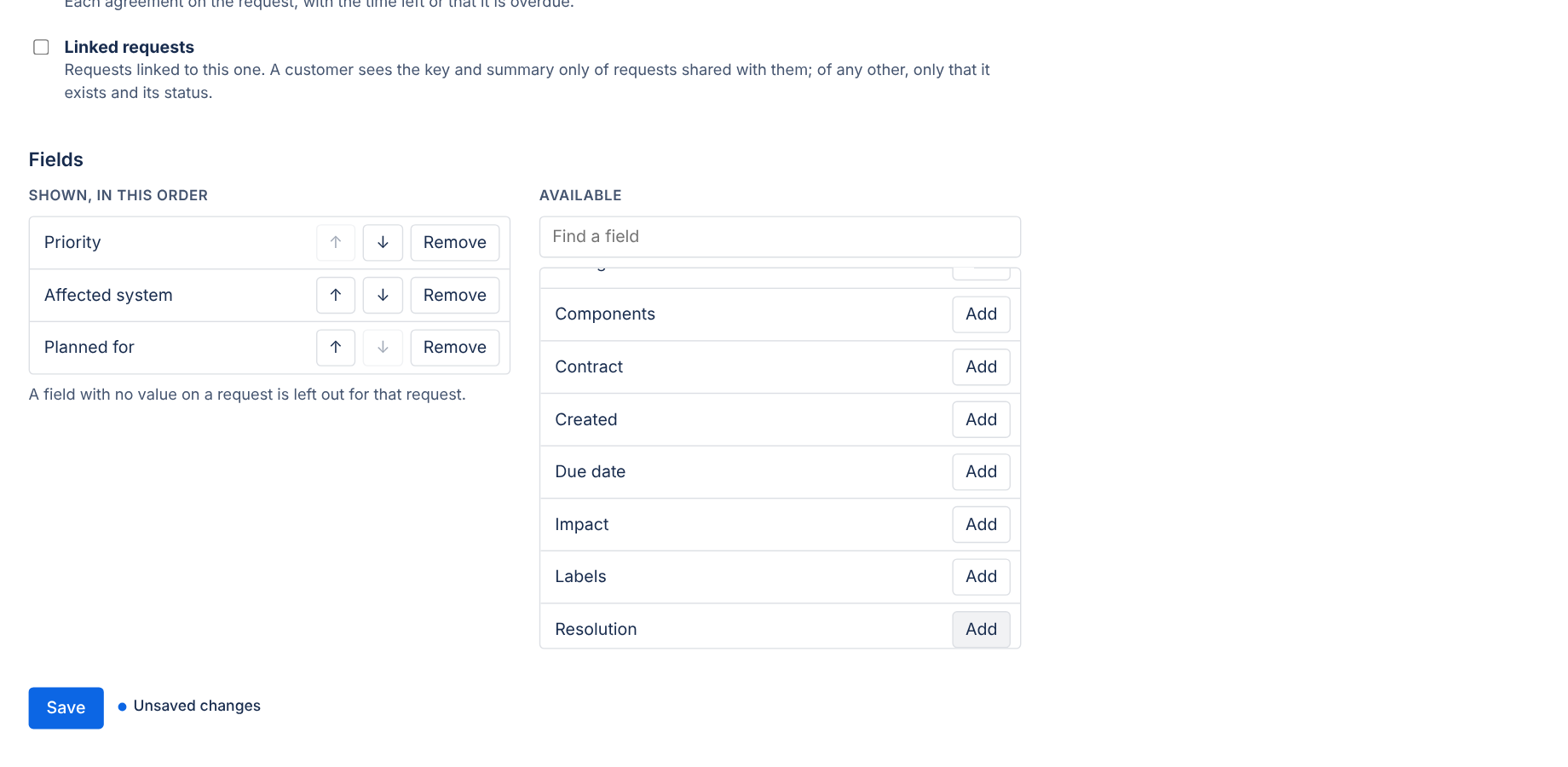
- Under About the request, tick what customers should see.
- Under Fields, add fields from the right-hand list. Use the arrows to put them in the order customers should read them in.
- Choose Save. The portal shows it at once.
Each service project has its own settings.
What customers see
A short list of names and values in the side column of the request. A field that has no value on a request is left out for that request; a request with nothing to show has no list at all.
| What | How it is shown |
|---|---|
| A date | 2026-12-02 |
| A date and time | 2026-12-02 09:30, in the time zone Jira holds it in |
| A choice with a sub-choice | Billing - Invoices |
| Several values | EU, US |
| Rich text | As plain text, paragraph by paragraph |
| An agreement that is running | 5h 40m left |
| An agreement that is paused | Paused, 1h left |
| An agreement that is overdue | Overdue by 2h 10m, in red |
| An agreement that is met | Completed, or Completed late |
| Nobody assigned | Not assigned yet |
Who sees it
The person who raised the request, the request's participants, and the members of an organisation the request is shared with: the same people the portal shows the request to. Anyone else is shown nothing.
Of a linked request, a customer sees the key and the summary only if that request is shared with them too. Otherwise they see how it is related and its status, and nothing more. This is so that linking a customer's request to internal work does not tell them what that work is called.
Comments, internal notes, work logs and attachments cannot be chosen as fields.
Limits
- Read-only: a customer cannot change a field from the portal.
- At most 20 fields are shown, and at most 10 linked requests.
- The portal's own layout cannot be changed by an app; the details appear in the side column, under what Jira shows there.
- Customers must be signed in.
Price
Free for sites of up to 10 users. Above that it is priced per user and billed by Atlassian with your other apps, after a 30 day trial. If a licence lapses, the portal shows what Jira's own portal shows, and your settings are kept.
Your data
The app runs on Atlassian's platform and sends nothing anywhere else. It keeps one small record per project: which fields and switches you chose. It stores nothing of what your requests say. See the privacy policy.
Help
Write to support@sigfrid.systems. Say which field or request is not shown as you expect, and what kind of field it is.
Questions
What does Portal Request Details cost?
It is free for sites of up to 10 users. From 11 to 100 users it is 1.00 USD an agent a month, less at each larger tier, and Atlassian bills it with your other apps. Atlassian gives every paid app a 30-day trial. Customers who only use the portal need no license to see the details.
Does any of our request data leave Atlassian?
No. The app runs on Atlassian's platform and sends nothing anywhere else. It keeps one small record per project in Atlassian's storage for apps: which fields and switches you chose. It stores nothing of what your requests say.
What permissions does it ask for, and why?
A customer cannot read most of a request through Jira's own API, so the app reads it on their behalf, and answers only to someone the request is shared with. It asks for:
read:jira-work, for a request's fields, status, assignee and links, and the list of the site's fields;read:servicedesk-requestandmanage:servicedesk-customer, to see whom a request is shared with, which decides who is shown anything;read:request.sla:jira-service-management, to read service level agreements;storage:app, to keep what each project shows.
What happens if our license lapses?
The portal shows what Jira's own portal shows, and the panel is empty. Your settings are kept for when the license is renewed, but they cannot be saved while it is lapsed.
Is there a version for Jira Service Management Data Center or Server?
No. The app is built on Atlassian Forge and runs on Jira Service Management Cloud only.
Does it work in dark mode?
Yes. The panel follows the portal's theme, light or dark, and so does the settings page.
Who sees the details on a request?
The person who raised the request, its participants, and the members of an organization the request is shared with: the same people the portal shows the request to. Anyone else is shown nothing. Customers must be signed in.
A customer sees no details. What do I check?
- In Project settings, Apps, Portal request details, that something is ticked or added, and saved. Nothing is shown until you choose something.
- That the request has a value in the fields you chose. A field with no value is left out, and a request with nothing to show has no list at all.
- That the customer is signed in and the request is shared with them.
- That the app's license has not lapsed.
Each service project has its own settings, so check the project the request belongs to.
Why does a linked request show only its relation and status?
The customer may not see that request. Of a linked request, a customer sees the key and the summary only if it is shared with them too. Otherwise they see how it is related and its status, so that linking a customer's request to internal work does not tell them what that work is called.
Why can't I find a field in the list to add?
Comments, internal notes, work logs and attachments cannot be chosen, so that they never reach a customer. Of Jira's own fields, the list offers priority, due date, resolution, resolution date, created, updated, components, labels, fix versions and environment; the status, assignee, agreements and linked requests have switches of their own under About the request. Your custom fields are offered, except kinds that have no plain reading or belong to agents, such as sprint, rank, approvals and the agreement fields themselves.
A project shows at most 20 fields, and at most 10 linked requests are looked up.
Why can't I save the settings?
You need to administer the service project; anyone else is told that only an administrator of the project can change this. If you are an administrator and saving still fails, check whether the app's license has lapsed.
How do we get help?
Write to support from https://mart.sigfrid.systems/support/. Say which field or request is not shown as you expect, what kind of field it is, and copy any error message word for word. Leave out what the request itself says; we will ask if we need an example.
Still stuck? Search every app's help in the help centre, or write to us.
More from Sigfrid Mart
-

Markdown Pages for Confluence
Import Markdown folders as page trees, edit pages as Markdown, and export pages to Markdown with their images.
-

Mermaid Diagrams & Export for Confluence
Mermaid diagrams drawn sharp at full width, zoomable, in dark mode, and kept as pictures in exports.
-

OpenAPI Viewer for Confluence
OpenAPI and Swagger files as API documentation on a Confluence page, with nothing sent out.
-

Plain Text Mode for Jira
Edit Jira descriptions and comments as plain Markdown. Nothing rewrites what you type.
-

PlantUML & Graphviz Diagrams for Confluence
PlantUML, C4 and Graphviz diagrams drawn in your browser, with no rendering server.
-

Space Copy for Confluence
Copy a Confluence space, or into one, with its links leading to the copies.