 Atlassian Marketplace
Plain Text Mode for Jira
Edit Jira descriptions and comments as plain Markdown. Nothing rewrites what you type.
What it does
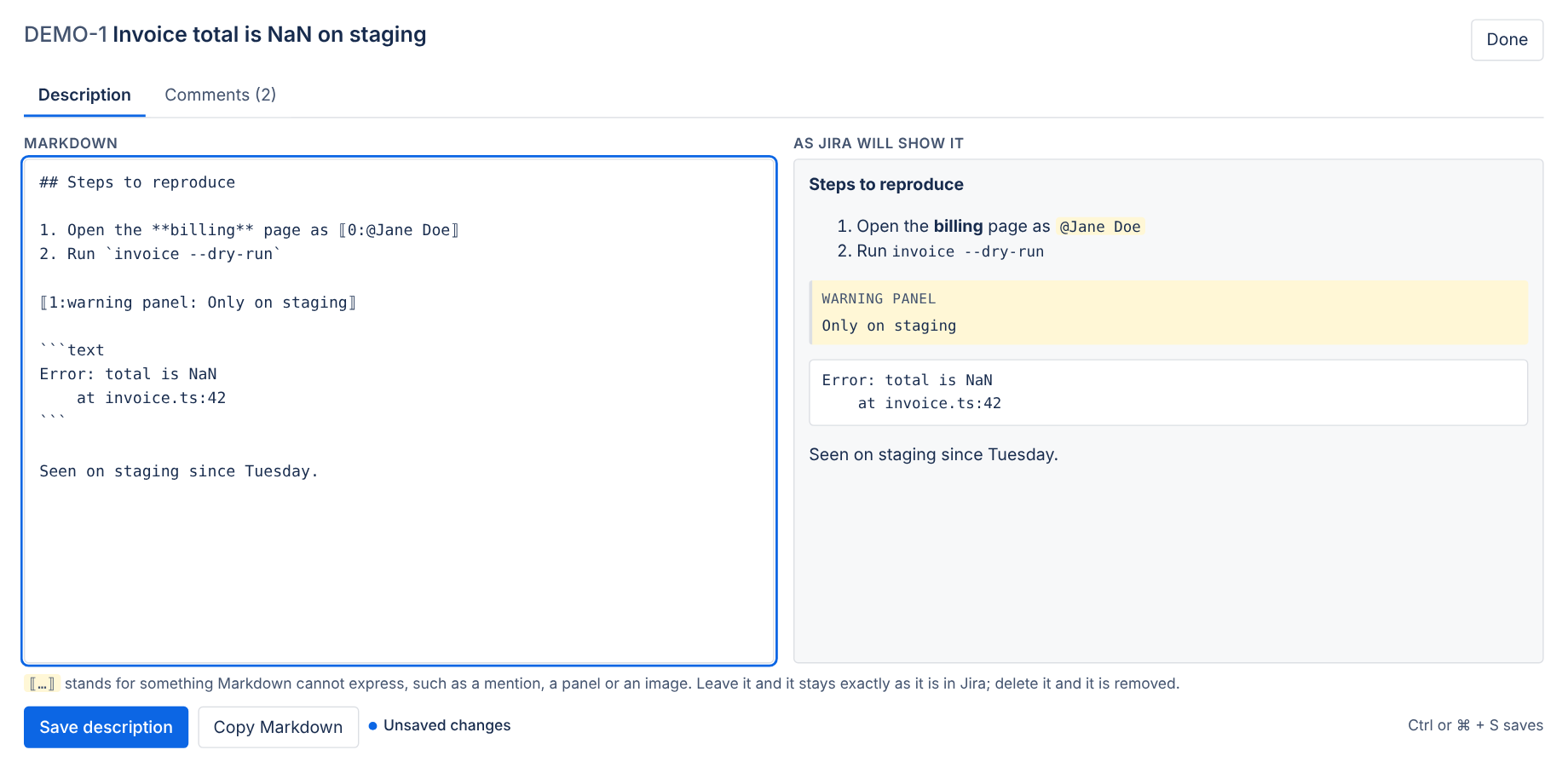
Jira's editor formats text as you type and has no source view. Plain Text Mode adds one: a plain text area holding the description or a comment as Markdown, beside a preview of what Jira will show.
Using it
- Open a work item, then the ⋯ menu at its top right.
- Choose Edit as Markdown.
- Pick Description or Comments.
- Edit on the left; the right side shows what Jira will show.
- Choose Save description or Save comment, or press Ctrl or ⌘ + S.
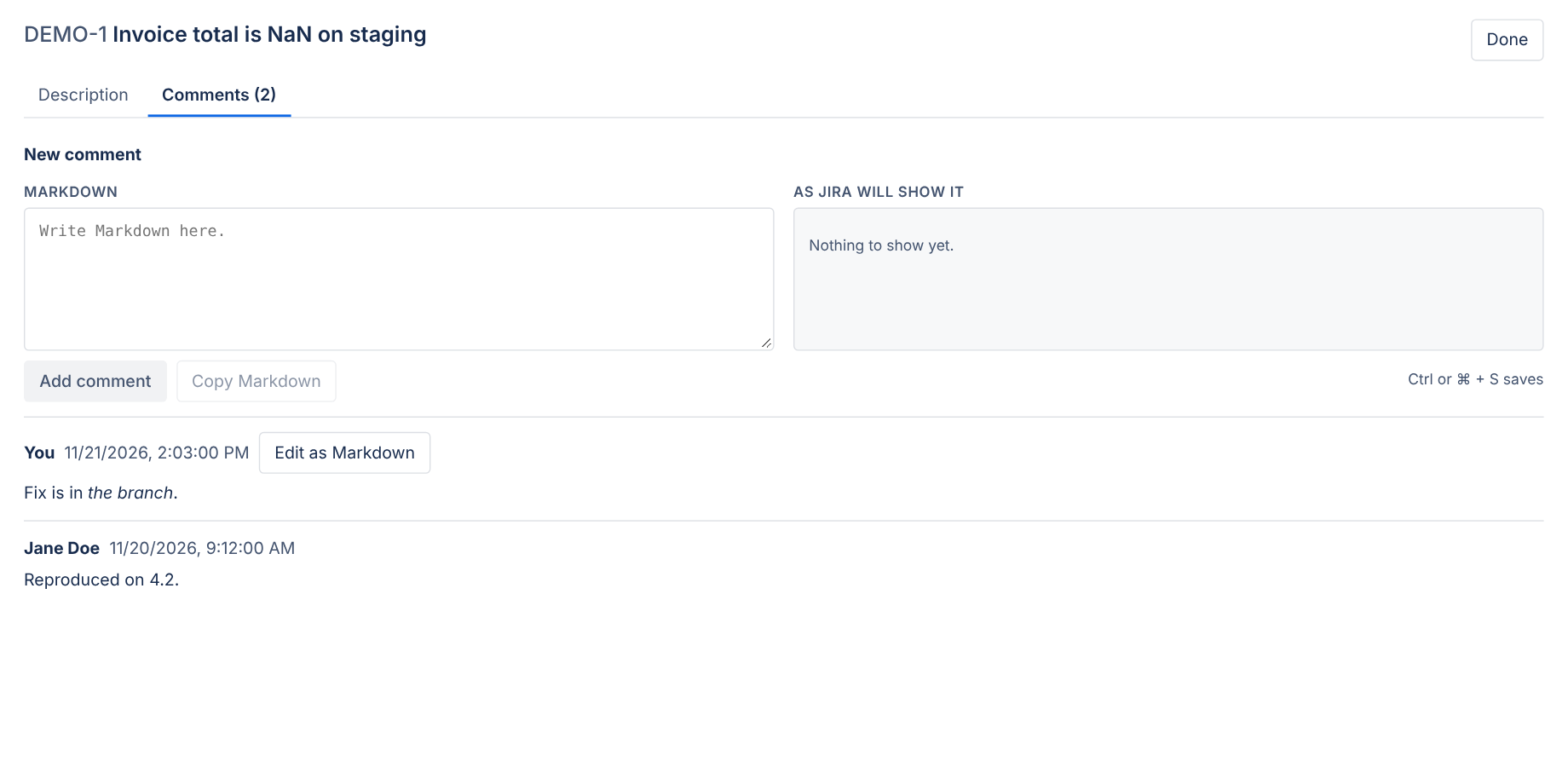
Under Comments you can add a comment, or edit one of your own. Jira decides whose comments you may edit; the app follows it.
Copy Markdown copies the text as it stands, which is also a quick way to take a description into a README, a chat or an AI assistant, and to bring the answer back.
Tokens
Some things have no Markdown form: a mention, a panel, an image, a status, coloured text. Each appears in the text as a short token:
⟦2:@Jane Doe⟧
Leave a token where it is and what it stands for is saved back exactly as it was. Move the token and it moves. Delete the token and it is removed. The text inside a token is only a label; editing it changes nothing.
If someone else edits at the same time
If the description was changed in Jira while you were editing, yours is not saved over it. Copy your Markdown, reload, and apply your changes to the newer text.
What it supports
Headings, bold, italic, strikethrough, links, ordered and unordered lists, task lists, tables, quotes, code blocks with a language, inline code and horizontal rules, as GitHub-flavoured Markdown. It works in team-managed and company-managed projects.
What it does not do
- It does not replace Jira's own editor; it is an action on the work item.
- It does not upload images: an image written in Markdown becomes a link to its address.
- It shows a work item's newest 1,000 comments.
Privacy and security
The app runs in your browser, inside Jira, and works through Jira's own API with your permissions: it can read and change only what you can. It has no server behind it and stores nothing. See the privacy policy.
Permissions it asks for, and why:
| Permission | Used to |
|---|---|
read:jira-work |
Read the description and comments |
write:jira-work |
Save the description and comments |
read:jira-user |
Tell which comments are your own |
Price
Free for sites of up to 10 users. Above that it is priced per user and billed by Atlassian with your other apps, after a 30 day trial. If a licence lapses, nothing you made is hidden: what is on your pages stays shown, and only making and changing are turned off.
Help
See support.
Questions
What does Plain Text Mode cost?
It is free for sites of up to 10 users. From 11 to 100 users it is 0.50 USD a user a month, less at each larger tier, and Atlassian bills it with your other apps. Atlassian gives every paid app a 30-day trial.
Does any of our work item data leave Jira?
No. The editor runs in your browser, inside Jira, and reads and saves through Jira's own API as you. The app has no server behind it, no function and no storage.
What permissions does it ask for, and why?
read:jira-work, to read the description and comments;write:jira-work, to save the description and comments;read:jira-user, to tell which comments are your own.
It works with your permissions, so it can read and change only what you can.
What happens if our license lapses?
Descriptions and comments you saved are ordinary Jira text and stay as they are. Saving is turned off in the editor, which says that the license has lapsed. You can still open a work item as Markdown, read it and copy it.
Is there a version for Jira Data Center or Server?
No. Plain Text Mode is built on Atlassian Forge and runs on Jira Cloud only. It works in team-managed and company-managed projects.
Does it work in dark mode?
Yes. The editor uses Jira's own colors and follows your theme, light or dark.
Why was my description not saved?
If the editor says the description changed in Jira while you were editing, someone else saved it first, and yours is not saved over theirs. Copy your Markdown, reload, and apply your changes to the newer text.
Why can't I edit someone else's comment?
Jira decides whose comments you may edit, and the app follows it. Under Comments you can add a comment, or edit one of your own.
What are the codes like ⟦2:@Jane Doe⟧ in my text?
They are tokens for things that have no Markdown form, such as a mention, a panel, an image, a status or colored text. Leave a token where it is and what it stands for is saved back exactly as it was. Move it and it moves; delete it and it is removed. Editing the text inside a token changes nothing.
Why did my image turn into a link?
The app does not upload images. An image written in Markdown becomes a link to its address. To show an image in the work item, add it with Jira's own editor.
Why can't I find an older comment?
The editor shows a work item's newest 1,000 comments. Edit an older one in Jira's own editor.
How do we get help?
Write to support from https://mart.sigfrid.systems/support/. Say which kind of project the work item is in, what you did and what happened, and copy any error message word for word. A few lines of the Markdown that did not come out as you expected help most.
Still stuck? Search every app's help in the help centre, or write to us.
More from Sigfrid Mart
-

Markdown Pages for Confluence
Import Markdown folders as page trees, edit pages as Markdown, and export pages to Markdown with their images.
-

Mermaid Diagrams & Export for Confluence
Mermaid diagrams drawn sharp at full width, zoomable, in dark mode, and kept as pictures in exports.
-

OpenAPI Viewer for Confluence
OpenAPI and Swagger files as API documentation on a Confluence page, with nothing sent out.
-

PlantUML & Graphviz Diagrams for Confluence
PlantUML, C4 and Graphviz diagrams drawn in your browser, with no rendering server.
-

Portal Request Details for Jira Service Management
Show customers custom fields, the assignee, SLA time left and linked requests on the portal.
-

Space Copy for Confluence
Copy a Confluence space, or into one, with its links leading to the copies.